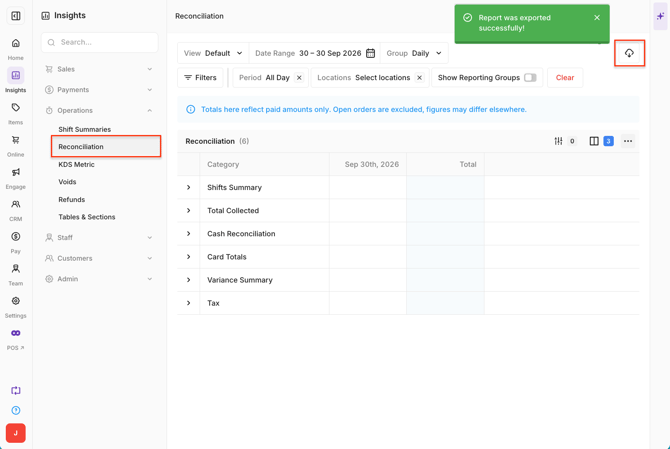
The Reconciliation report in Oolio One provides an overview of sales and takings for a selected trading period. Use the report to compare recorded and counted payment amounts, review cash and card totals, and identify variances that may need investigation.
The report includes sales, payment and tax information from completed transactions.
Open the Reconciliation report
- Open Back Office > Insights > Operations > Reconciliation.
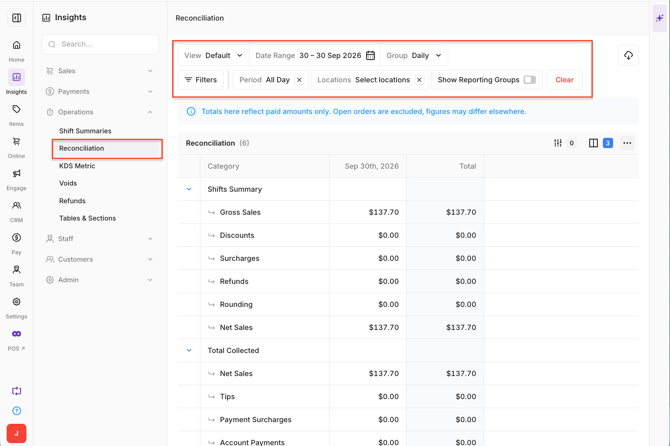
- Select the required Date Range, Period and Locations.
By default, the report opens to the current week with results grouped by day.
Use View to change the report layout or Group By to change how the results are grouped.
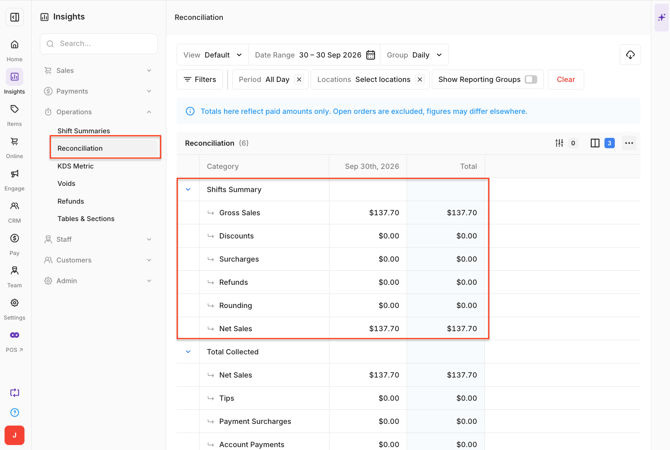
Review the Shifts Summary
The Shifts Summary provides an overview of sales activity for the selected period.
The summary includes:
- Gross Sales: Total sales before Discounts, Surcharges, Refunds and other adjustments.
- Discounts: Total value of Discounts applied to sales.
- Surcharges: Total value of Surcharges applied to sales.
- Refunds: Total value of refunded sales.
- Rounding: Cash rounding adjustments applied to transactions.
- Net Sales: Sales after the applicable adjustments shown in the report.
Enable Show Reporting Groups to break sales down by Reporting Group, such as Food, Drinks or Beverage.
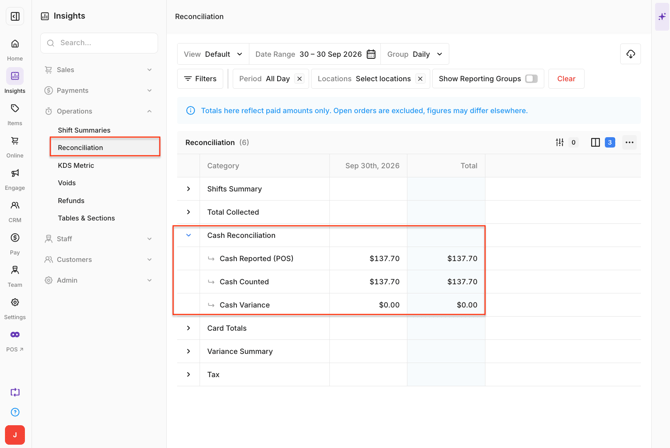
 Understand Cash Reconciliation
Cash Reconciliation compares the amount of cash recorded through Oolio One with the amount entered when the Shift was closed.
- Cash Reported (POS): Total cash recorded through payments in Oolio One.
- Cash Counted: Total cash entered when the Shift was closed.
- Cash Variance: Difference between the cash recorded and the cash counted.
A variance indicates that the amount entered during reconciliation does not match the amount recorded through Oolio One.
Important: A negative Cash Variance means the counted cash is less than the amount recorded in Oolio One.
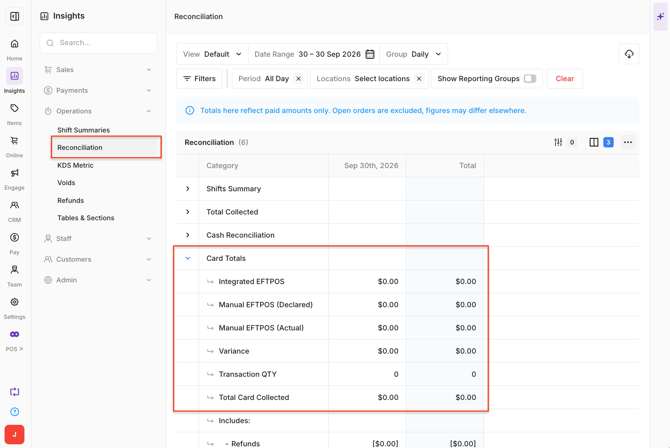
Understand Card Totals
Card Totals provides an overview of card payments recorded for the selected period.
The report includes:
- Integrated EFTPOS: Card transactions processed by selecting the integrated EFTPOS payment method in Oolio One.
- Manual EFTPOS (Declared): Payments recorded in Oolio One as Manual EFTPOS after being processed directly on the payment terminal.
- Manual EFTPOS (Actual): Actual payment totals retrieved from the Oolio Pay terminal.
- Variance: Difference between the declared and actual card payment amounts.
- Transaction QTY: Number of card transactions processed.
- Total Card Collected: Total card payments collected for the selected period.
Total Card Collected can include:
- MOTO: Card-not-present transactions processed through Oolio One and the integrated Oolio Pay terminal.
- Refunds: Refunded card transactions, displayed as negative amounts.
- Tips: Tips entered by customers through the Oolio Pay terminal.
Understand the Variance Summary
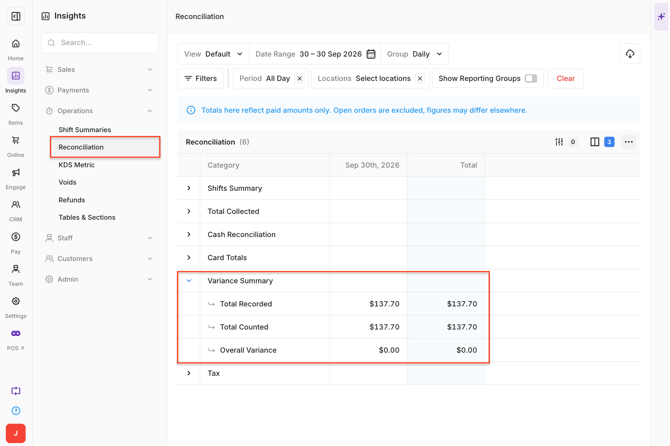
The Variance Summary compares recorded payment amounts with the amounts counted or confirmed during reconciliation.
- Total Recorded: Total monetary value recorded in Oolio One across the included Payment Types.
- Total Counted: Total actual value entered or confirmed during reconciliation.
- Overall Variance: Difference between the recorded and counted amounts.
An Overall Variance of $0.00 indicates that the recorded and counted amounts balance.
A variance may be:
- Negative: The counted or received amount is less than the amount recorded.
- Positive: The counted or received amount is greater than the amount recorded.
 Understand Other Payment Types
Additional Payment Types configured for the Location are also included in the Reconciliation report.
For example, Gift Voucher payments may display:
- Gift Voucher Reported: Total Gift Voucher payments recorded in Oolio One.
- Gift Voucher Counted: Total Gift Voucher payments entered or confirmed during reconciliation.
- Gift Voucher Variance: Difference between the reported and counted amounts.
A variance of $0.00 indicates that the Payment Type balances.
Identify a variance
Variances highlight differences between the amounts recorded in Oolio One and the amounts counted or confirmed during reconciliation.
When a variance appears, check the relevant payment section to identify where the difference occurred.
Common areas include:
- Cash Variance: Compare the physical cash counted with the amount recorded in Oolio One.
- Card Variance: Compare declared card payments with the actual payment total.
- Other Payment Types: Check any additional Payment Type displaying a variance.
Important: Reconciliation calculations include paid amounts. Open or unpaid orders are not included, which may cause totals to differ when comparing the Reconciliation report with reporting that includes current trading activity.
Export the Reconciliation report
Export the report when the reconciliation data is required outside Oolio One.
- Select the Export icon in the top-right corner.
- Select CSV.
The downloaded CSV contains the reconciliation data displayed for the selected reporting period.