
Review sales trends, trading patterns, and average order values using the Sales Summary Report in Oolio One Insights.
Use the report to understand when you are busiest, compare trading periods, and identify opportunities to improve performance.
Step 1: Open the Sales Summary Report
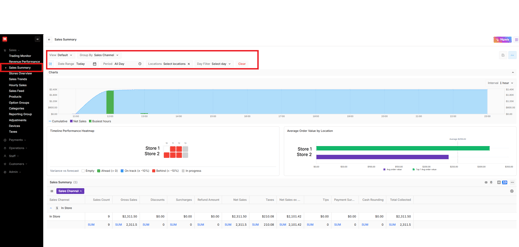
Open Oolio One, select Insights, then select Sales Summary.
Step 2: Select a Date Range
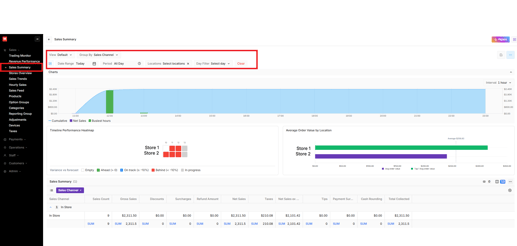
Choose a date range, location, and optional day filter to focus on the trading period you want to review.
Step 3: Review the Sales Trend Chart
Review daily sales trends and compare performance against the average sales line.

Step 4: Review Sales Heatmaps
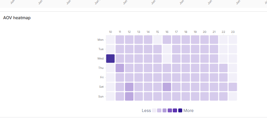
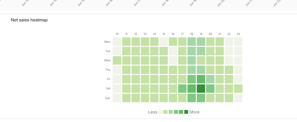
Use AOV and Net Sales heatmaps to identify busy periods and customer spending patterns.
Step 5: Review the Sales Summary Grid
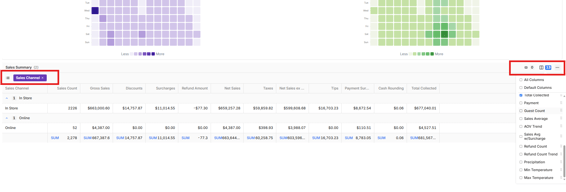
Review detailed sales information and compare performance across channels, locations, or other groupings.
Step 6: Single Day Performance
Select a single date in the date range picker to activate Single Day view. This view shows
- Hourly bar chart — Net Sales by hour. Top 2 hours highlighted in green; remaining hours in purple. Non-trading time excluded.
- Cumulative area chart — overlaid on the secondary Y-axis showing the pace of sales building through the day
- Interval toggle — switch between 15-minute and 1-hour intervals
- Timeline Performance Heatmap — one row per location, hourly cells colour-coded by variance vs forecast
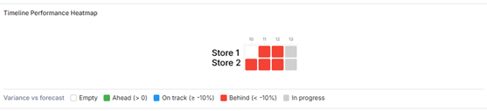
Colour Meaning
Green Within ±10% of forecast
Amber ±10–25% variance
Red Greater than ±25% variance
Grey Hour is incomplete
Step 7 — Performance / Budget
Change the view to Performance / Budget and select the date range and (if applicable) the Locations to see a performance overview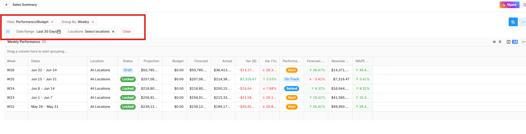 You can also change the Group By between Daily, Weekly and Monthly
Important Information
Heatmaps only appear when the selected date range is greater than three days.
Single Day View only appears when a single date is selected.
Timeline Performance requires forecast data to be configured.
Grey cells indicate trading periods that have no data available.