
Oolio One is cloud-based and requires an internet connection for full POS functionality. If the internet connection is interrupted, Offline Mode allows core POS functions to continue with some limitations until the connection is restored.
While offline, orders should be managed on the same POS device, as information cannot be shared between devices until connectivity returns.
Identify when the POS is offline
When the POS is connected to the internet, a heartbeat icon with a green dot appears in the upper-right corner of the screen.
If the internet connection is lost:
- No Internet Connection appears across the top of the POS.
- An offline notification appears on the screen.
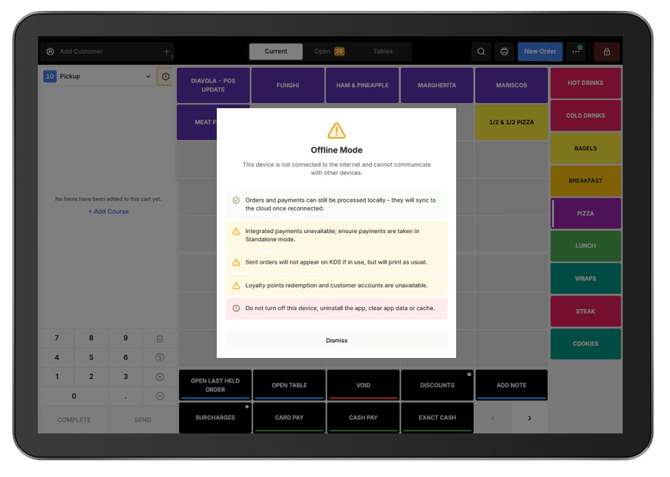
What can be done in Offline Mode?
Core ordering, manual payment, printing, and table management functions remain available while offline.
Place and manage orders:
-
Orders can continue to be created and updated, but they must be managed on the same POS device.
-
While offline, continue using:
- Open Orders
- Menu Screen
- Floor View
- Payment Screen
Important: Avoid moving between POS devices while offline. Continue managing an order on the device where it was created until the internet connection is restored.
Process payments:
-
Accept Cash payments.
-
Accept other manual payment types available through the Function Buttons or Payment screen.
-
Process card payments using a standalone payment terminal, then record the payment on POS using the appropriate manual payment type, such as Manual EFTPOS.
-
Integrated payments cannot be processed while the POS is offline.
Print orders and receipts:
-
Printing can continue while the venue's local network remains available.
-
While offline:
-
Kitchen printing continues over the local network.
-
Customer receipts can be printed.
-
Cash drawers continue to open as usual.
-
Manage tables:
-
Floor View operations can continue on the same POS device.
-
This includes actions such as:
-
Transferring orders.
-
Merging orders.
-
Important: Complete these actions on the same device while operating offline.
What is unavailable in Offline Mode?
Some Oolio One functions require an internet connection and cannot be used until connectivity is restored.
Payments and orders:
-
While offline:
-
Integrated payments cannot be processed.
-
Orders cannot be placed on Customer Accounts.
-
Order History is limited to information already synced to the device.
-
Staff and shifts:
-
While offline:
-
Staff cannot clock in or out.
-
End of Day Shift reports cannot be completed or viewed.
-
Loyalty and KDS:
-
While offline:
-
Oolio Loyalty Points cannot be accrued or redeemed.
-
Dockets do not display on KDS devices.
-
Online orders and integrations:
-
The POS cannot receive orders from:
-
Oolio Online Ordering
-
Kiosk
-
Third party platforms, including Uber Eats and DoorDash
-
-
Full functionality resumes when the internet connection is restored.
Manage Online and QR ordering during an outage
Online and QR code orders cannot be received by the POS while it is offline:
-
If required, temporarily disable Online and QR ordering through Back Office using another internet connection, such as a mobile hotspot.
-
Alternatively, contact Oolio Support for assistance.
Manage Uber Eats and DoorDash orders:
-
During an internet outage, use the relevant Uber Eats or DoorDash ordering app to monitor and manage orders from those channels.
-
Orders will sync after the connection is restored so they can be included in reporting.
Need help?
If assistance is required during an internet outage, contact Oolio Support on 1300 166 546.