
Weather can be a contributing factor to highs and lows in the Hospitality industry.
We've added weather forecasts to Insights to help you review sales and make sales forecasting easier.
How accurate is the Weather forecasting?The results displayed to you are sourced for a radius no larger than 50km from your Location address.
If the address for each Location (if you have multiple) is correct, the weather will be as accurate as we can provide you based on the data available for that area.
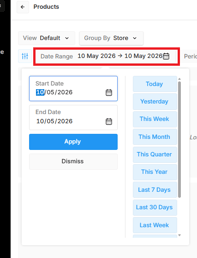
The temperature and rainfall displayed alters based on the date/s selected.
- One day = actual temperature and rainfall
- Date range = averaged temperature and rainfall
Which Insights reports are included
Sales Summary Report
Insights → Sales Summary
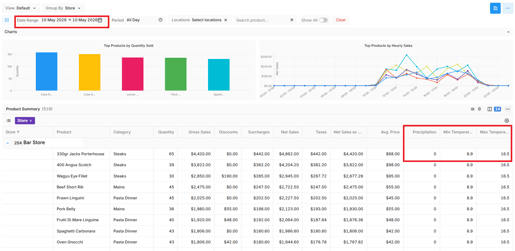
- Scroll down to the data grid, add the Weather fields to the report in the field selector
- If there are columns you don't want, untick them in the list
- It may be necessary to scroll over to see the full detail
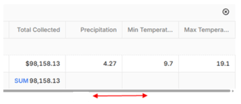
- Note that once the weather columns are added, the report defaults to Group by Store
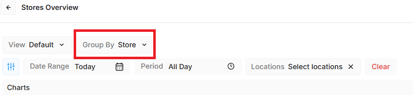
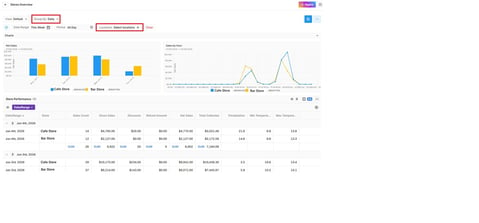
- To view the data grid in other formats, change the filters — try different options to find the one that works, e.g. Group By option (e.g. to daily), Locations set to all
Hourly Sales Report
Much the same as Sales Summary in regard to setting filters and adding columns.
The data grid displays sales by hour and the weather displayed is either accurate for the date or averaged for the range.
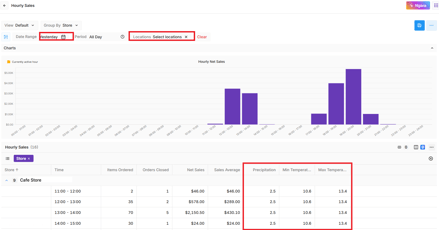
- Filtering options are the same as the previous reports.
- For Product sales, once you add the weather, you can see which products perform well or poorly in different weather conditions.
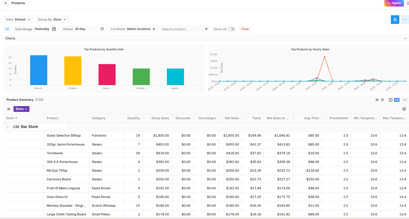
-
Change the date to an event in the past, e.g., Mother's Day, to see what was popular and what the weather was.
- Option Groups
- Categories
- Reporting Group
- Adjustments
- Devices
Weather in Forecast and Budget Planning
Weather is also integrated into Forecast and Budget Planning, providing uplift to help you more accurately budget and forecast sales.