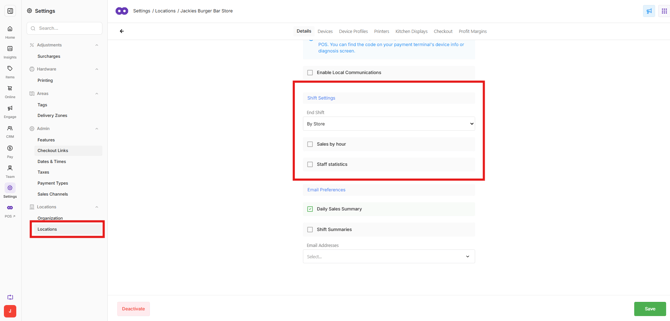
Shift Settings control how shifts are closed and reconciled in Oolio One POS. The appropriate setting depends on how the venue operates, including whether cash drawers are assigned to individual POS devices or shared across the venue.
Shift Settings are configured for each venue in Oolio One Back Office and generally only need to be changed when the venue's shift closure workflow changes.
Open Shift Settings
- Open Back Office > Settings > Locations.
- Select the required Venue.
- Open Shift Settings.
End Shift
Use End Shift to determine how sales and cash are grouped when a shift is closed in POS.
Select the option that matches how the venue reconciles its shifts:
- By Device: Each POS device is closed and reconciled separately. This is suitable when each POS has its own dedicated cash drawer.
- By Store: All POS devices are reconciled together as a single shift. This is suitable when multiple devices share a cash drawer or the venue reconciles all POS devices together.
By Store is the most common option for venues where sales and cash are reconciled together at the end of a trading period.
Sales by Hour
Enable Sales by Hour to include an hourly breakdown of sales on the Shift Summary.
This makes it possible to review the sales amount recorded during each hour of the completed shift.
Staff Statistics
Enable Staff Statistics to include a breakdown of sales by staff member on the Shift Summary.
This adds a section to the Shift Summary showing the sales recorded by each user, making it easier to review individual staff sales for the shift.