
The Round Off feature adjusts order totals when a cash payment is processed in Oolio One POS. It can be used to round cash totals to increments such as $0.05, $0.10 or $1.00 where the exact amount cannot be paid using available coins.
Round Off is configured for each location in Oolio One Back Office and applies to cash payments only. Other payment types are not rounded.
Configure Round Off
- Open Back Office > Settings > Locations.
- Select the required Store.
- Open Checkout.
- Enable Enable Round Off.
- Open the Value dropdown.
- Select the required round-off value:
- 1
- 0.5
- 0.25
- 0.1
- 0.05
- Select Save.
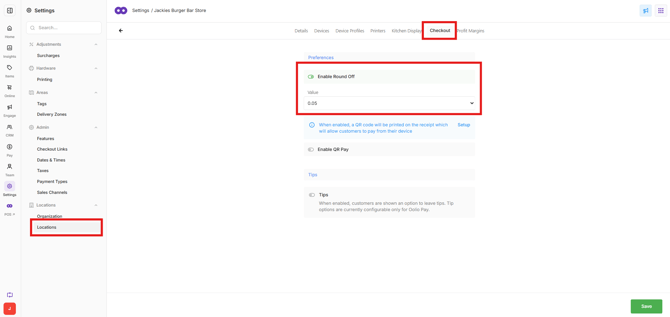
The configured rounding is applied when an order is paid using cash in POS.
How Round Off works
The selected Value determines the increment used to round the cash payment total.
Important: Cash rounding requirements can vary by country. Check the applicable local consumer and payment laws before configuring Round-Off to ensure the selected value meets local requirements.
Round-Off value: 0.05
In Australia, cash transaction totals are rounded to the nearest 5 cents where the exact amount cannot be paid because 1 and 2 cent coins are not available. Electronic payments do not require this rounding.
A value of 0.05 rounds the cash total to the nearest five cents and is the appropriate setting for standard Australian cash rounding.
For example:
- $4.91 or $4.92 rounds to $4.90.
- $4.93 or $4.94 rounds to $4.95.
- $4.96 or $4.97 rounds to $4.95.
- $4.98 or $4.99 rounds to $5.00.