
Money In and Money Out events can be used to track cash added to or removed from a POS till outside of normal sales. Create cash events for activities such as adding a float, recording petty cash, or withdrawing tips.
Completed cash events are recorded in Shift Reports and in Sales Reports within the Cash section.
Step 1: Open Cash Events
Cash Events are configured for each venue in Oolio One Back Office.
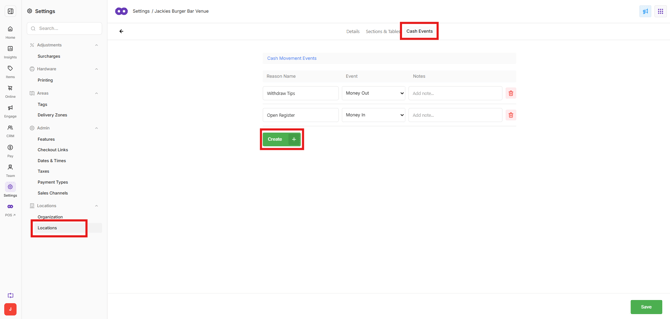
- Open Settings > Locations.
- Select the required Venue.
- Open Cash Events.
- Select Create + to create a new cash event.
Step 2: Create the cash event
Configure the reason staff will use when recording a cash movement in POS.
- Enter a Name that clearly identifies the purpose of the event, such as:
- Float In
- Petty Cash
- Tips
- For Event, select whether cash is being added to or removed from the till:
- Money In: Use when cash is being added, such as adding a float.
- Money Out: Use when cash is being removed, such as petty cash.
- Enter Notes to provide additional information about what the cash event is used for.
- Select Create Reason.
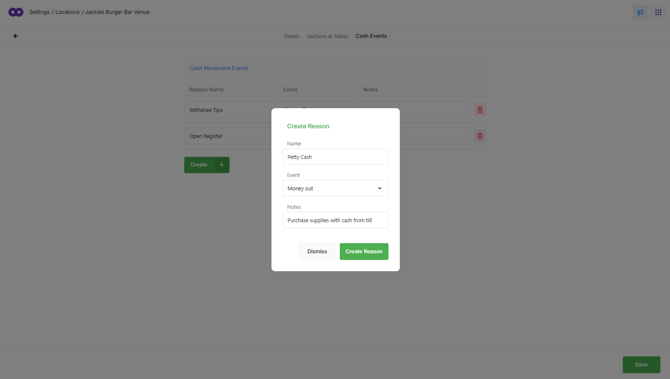
The new cash event is created and can be selected in POS when recording the corresponding Money In or Money Out transaction.